Learn words
as you browse
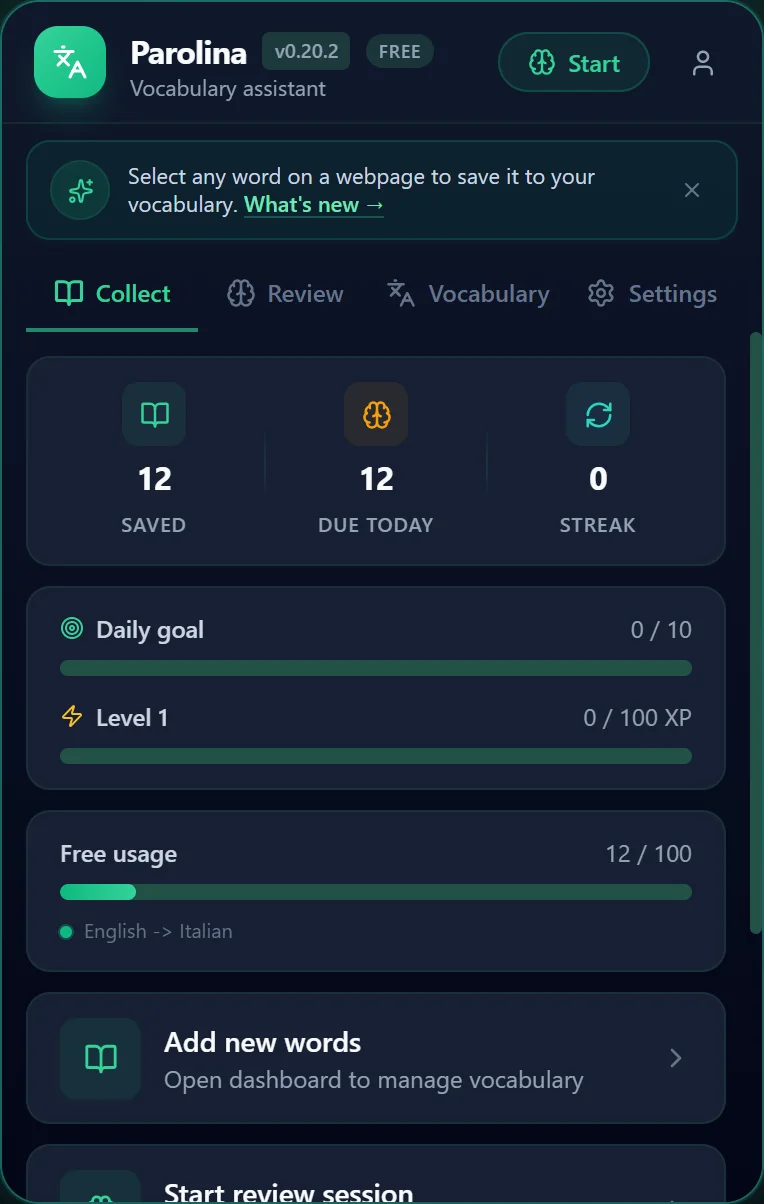
The popup — your daily hub
Not just a vocabulary saver.
A learning companion.
Parolina helps you turn real-world reading into personal vocabulary practice.
Instant & effortless
Select text, see translation, save. No copying, no switching apps, no breaking your reading flow.
Smart spaced repetition
8 interval levels with difficulty adjustment. Words you struggle with appear more often until mastered.
Seven ways to practice
Flashcards, typing, fill in the blank, drag & drop, and more — switch modes to keep practice fresh and make words stick. All free.
Works everywhere you read
Chrome and Edge. Any webpage, any language. Install once and learn from every article, blog, or book online.
Why not just use Google Translate?
Google Translate shows you a translation. Parolina helps you remember it. With spaced repetition, practice modes, and progress tracking, Parolina turns one-time translations into lasting vocabulary.
A look inside
Parolina
From the one-click popup to a full learning dashboard — here's what you'll be using every day. Swipe through, or tap to enlarge.Click any screenshot to enlarge.
Your daily learning hub
Open the popup to see what you've saved, what's due today, your streak and daily goal — all at a glance, without leaving the page you're on.
Practice that fits your day
Seven review modes — flashcards, typing, fill in the blank, drag & drop, reverse and more, plus a mixed session that shuffles them. Spaced repetition surfaces the right words at the right time, and every mode is free.
Every word, organized
Save with rich detail — translation, word type, tags, and the page you found it on. Then search and filter your whole library from one place.
See your progress
Accuracy, streaks, mastery and attention signals — so you always know what to review next and can watch your vocabulary grow over time.
A dictionary per language or topic
Keep separate lists for travel, work, or each language you're learning — and switch between them in a click as you save and review.
One extension, many ways to learn.
Wherever you read in another language, Parolina turns it into practice.
Turn daily reading into vocabulary
You read articles in your target language but the new words slip away by the next paragraph. Select a word, see the translation instantly, and save it with the sentence it came from — so every article quietly grows your vocabulary.
Learn the language around you
Living abroad means the local language is everywhere — government sites, shop pages, rental listings. Capture the words you actually need from the pages you actually visit, instead of memorising someone else's word list.
Build subject-specific glossaries
Research papers and textbooks in a second language are dense with terms. Keep a separate dictionary per subject, save technical vocabulary with its source URL for context, and review before exams.
Prep the words you'll really use
Planning a trip? As you browse guides, menus, and booking sites in the local language, save the phrases you'll need on the ground and drill them with spaced repetition before you fly.
Keep a second language sharp
Working across languages, you meet idioms and industry terms all day. Save them as you go and let spaced repetition keep them fresh, so your second language doesn't fade between projects.
Drill toward TOEFL, IELTS & JLPT
Preparing for a language certification rewards consistent vocabulary growth. Collect words from real reading material, track what's due each day, and watch your streaks build momentum toward test day.
From discovery to mastery
Five simple steps to turn everyday browsing into lasting vocabulary.
Select & Save
Highlight any word or phrase on a webpage. A floating button appears — one click saves it with context, source details, and nearby text.
Instant Translation
See a translation popup the moment you select text. Google Translate prefill works online; local dictionary fallback keeps it fast even offline.
Smart Enrichment
Parolina prefills translations, source metadata, and review-ready details so every save becomes a rich learning card.
Practice Daily
Review with flashcards, multiple choice, typing, fill in the blank, and more. Spaced repetition locks words into memory.
Master Forever
Words progress from New to Mastered across 8 interval levels. Track your streak and watch your vocabulary grow.
Watch it in 60 seconds
Short video lessons: real words from real texts, saved and reviewed with Parolina.
The lessons are Spanish. Parolina works with any pair of languages you pick.
Everything you need to
master vocabulary
Thoughtfully designed for curious readers who love languages.
Save from any webpage
Select text, click save. Parolina captures the word, context, and source URL automatically.
Instant translation popup
Select any word or phrase and see a translation instantly. No extra clicks, no context switch.
Smart translation prefill
Google Translate auto-suggests translations with unlimited smart prefill. Offline fallback keeps your save flow smooth.
Duplicate protection
Exact duplicates blocked. Same-text and similar-phrase warnings — never save the same word twice.
Organise with dictionaries
Create separate dictionaries for different languages or topics. Free plan: up to 2. Pro: unlimited.
Multiple practice modes
Flashcards, multiple choice, typing, fill in the blank, reverse translation, and hard words workout. Review smarter, not harder.
Spaced repetition
8 interval levels (1, 2, 4, 7, 14, 30, 60, 90 days) with difficulty adjustment. Daily queue shows what's due today.
Reminders & badge
Daily reminder notifications at your chosen time. Browser toolbar badge shows how many words are due for review.
Progress & streaks
Daily and weekly goals, streak counter, rank distribution, and per-dictionary statistics.
Dashboard analytics
Track weak words, forgotten items, and learning velocity. Advanced trend charts (Pro).
Export & backup
CSV export with 25 columns, CSV import with preview, JSON backup/restore, and Anki and Quizlet export (Pro).
Free cloud sync
Sign in with a free account and your words, dictionaries, and progress sync across devices and browsers. Free for everyone, fully opt-in — your data stays local-first until you choose to sync.
Study on any device
The Parolina web app (app.parolina.app) lets you add, edit, and review your vocabulary on your phone or any browser — no extension needed. Reviews there count and sync back.
Background animations
Give the dashboard and Settings a calm animated backdrop — Cosmos, Aurora, Nebula, Gradient, Bubbles, Waves, Fireflies, or Off. Each adapts to your theme's colours and syncs across your devices.
Local-first privacy
Your vocabulary stays on your device (IndexedDB) by default. Accounts and cloud sync are optional and free — nothing leaves your device until you sign in. Just anonymous, opt-out usage stats, never your words.
6 interface languages
English, Spanish, French, Italian, German, Russian. Dark, Light, or System theme.
Chrome & Edge
Works seamlessly on both browsers. Install once, learn everywhere.
Customisable settings
Toggle features on/off: selection tools, instant translate, context menu, reminders, and more.
Lightning fast
No lag, no bloat. Parolina loads instantly and stays out of your way until you need it.
Choose your
background animation
Give your dashboard a calm, living backdrop. Each style adapts to your theme's colours and syncs across your devices and the web app. Try them right here:
Faint nebula glows and a field of slowly twinkling stars.
Set it in the extension under Settings → Theme, or on the web app under Settings → Appearance. Respects your system “reduce motion” setting.
See every way to practise
Seven ways to turn the words you save into lasting memory — hover in and try them yourself.
Flip a card to reveal the translation.
Click the card to flip it.
All seven practice modes are free. Pro adds unlimited vocabulary and dictionaries, deeper analytics, and the Hard Words Workout.
Already helping — about to help more
Every word you save is translated by AI — Google Translate prepares the draft, and you edit it before it's stored. Deeper, generative help is what we're building next.
Translation drafts
The word you select comes back translated, ready to edit.
Word type detected
Noun, verb, adjective — filled in and filterable.
Pronunciation
Transliteration with stress marks, plus tap-to-hear audio.
Free for everyone. Only the text you select and a little surrounding context is sent to Google Translate — never the page you're on. How AI is used
Try a word
Illustration of a planned feature. These sentences are written by hand, not generated — AI enrichment isn't released yet.
None of the four above is released yet. Join the waitlist to try them first.
Start learning as you browse
Add Parolina to Chrome and save words from any page in a single click — then make them stick with smart, spaced review. Free to start.
Works with the browser
you already love
Parolina is live on the Chrome Web Store and Microsoft Edge Add-ons — add it in a click.
Start free. Grow when you need more.
No hidden costs, no time limits. A plan for every stage of your language journey.
Free
Start learning today
- Up to 100 vocabulary items
- Up to 2 dictionaries
- Unlimited Google Translate smart prefill
- Webpage selection and save
- Instant translation popup
- Dictionary definitions in the word's own language, with usage examples where Google has them
- Pronunciation and part of speech, filled in automatically
- Duplicate warnings
- All 7 practice modes — flashcards, multiple choice, drag & drop, typing, reverse, fill in the blank, word reveal — plus a Mixed session that shuffles between them
- Spaced repetition, streaks, and goals
- Daily reminders and badge
- CSV export and JSON backup/restore
Pro
For serious learners
VAT included · about €2.50/month. Cancel anytime.
- Unlimited vocabulary and dictionaries
- Hard words workout
- Advanced analytics: trends, weak areas
- Smart learning suggestions
- Anki and Quizlet export
- Multiple reminder schedules
Sign in at app.parolina.app to subscribe.
| Feature | Free | Pro |
|---|---|---|
| Capture & save | ||
| Select & save from any webpage | Included | Included |
| Words, phrases, idioms & sentences | Included | Included |
| Source URL & surrounding context saved | Included | Included |
| Instant translation popup | Included | Included |
| Smart prefill (AI translation drafts) | Included | Included |
| Source-site tag on every saved word | Included | Included |
| Duplicate warnings | Included | Included |
| Vocabulary items | 100 | Unlimited |
| Dictionaries | 2 | Unlimited |
| Practice & review | ||
| Flashcards | Included | Included |
| Multiple choice | Included | Included |
| Drag & drop | Included | Included |
| Typing | Included | Included |
| Reverse translation | Included | Included |
| Fill in the Blank | Included | Included |
| Word reveal | Included | Included |
| Mixed review | Included | Included |
| Spaced repetition (8 interval levels) | Included | Included |
| Streaks & daily goals | Included | Included |
| Hard Words Workout | Not included | Included |
| Reminders & progress | ||
| Daily reminder & badge counter | Included | Included |
| Multiple reminder schedules | Not included | Included |
| Basic progress stats | Included | Included |
| Advanced analytics (trends, weak areas) | Not included | Included |
| Smart learning suggestions | Not included | Included |
| AI enrichment | ||
| Multiple meanings & alternatives | Included | Included |
| Part-of-speech detection | Included | Included |
| Pronunciation — transliteration + audio | Included | Included |
| Dictionary definitions, with examples | Included | Included |
| AI-generated example sentences | Not included | Soon |
| Plain-language explanations | Not included | Soon |
| Collocations & natural phrases | Not included | Soon |
| Data & privacy | ||
| Local-first storage (works offline) | Included | Included |
| No account required | Included | Included |
| CSV import & export | Included | Included |
| JSON backup & restore | Included | Included |
| Anki / Quizlet export | Not included | Included |
| Sync & account | ||
| Cloud sync across devices & browsers | Included | Included |
All seven practice modes are free. Soon = planned for a future release. Pro pricing will be announced at launch.
Duplicate warnings, CSV export, and JSON backup/restore are always free — these are trust and data-safety features.
Made for people who read the web
Curious readers
Reading articles, docs, forums, or news in another language? Save the words you don't know the moment you meet them — and actually remember them later.
Students & exam prep
Turn course material and practice texts into a personal review deck, with spaced repetition and progress tracking built in.
Expats & professionals
Pick up everyday and domain-specific vocabulary from the real pages you read for work and life — organized into your own dictionaries.
Questions? We have answers.
Everything you need to know about Parolina.
Yes, and the free plan is the whole product rather than a trial of it: up to 100 saved words and 2 dictionaries, the instant translation popup, dictionary definitions with pronunciation and part of speech, all 7 practice modes (flashcards, multiple choice, drag & drop, typing, reverse, fill in the blank, word reveal) plus a Mixed session that shuffles between them, spaced repetition with streaks and goals, daily reminders, free cloud sync across your devices, and CSV export with a full JSON backup. Pro adds unlimited words and dictionaries, the Hard Words Workout, advanced analytics with smart suggestions, Anki and Quizlet export, and multiple reminder schedules.
A browser extension for the words you meet while reading. Select a word, a phrase or a whole sentence on any page and save it — the translation, a dictionary definition, the pronunciation, the part of speech, the sentence you found it in and the page it came from are filled in for you. Then it comes back for review until it sticks.
Chrome and Microsoft Edge, both live in their stores today. On a phone, where neither browser can install extensions, the web app at app.parolina.app gives you the same vocabulary and the same practice modes in the browser you already have. Firefox is not supported yet.
Google Translate answers a question and forgets it. Parolina uses the same translation to start a card, and then does the part that makes a word stick: it keeps the sentence you found the word in, files it in the dictionary for that language pair, and brings it back on a schedule until you know it. The translation is a draft you correct, not an answer you accept — you edit anything you disagree with before it is saved.
Any ordinary web page — articles, blogs, news, documentation, research papers, forums. Select the text and the save panel appears where you are reading, so you do not leave the page. Pages a browser extension cannot touch at all, like the browser's own settings pages and the extension stores, are the exception.
Any pair Google Translate handles, in either direction, and you can keep several pairs side by side. The interface itself is translated into English, Spanish, French, Italian, German and Russian — the whole interface, not only the popup.
The exact text you select, sent to Google Translate to fetch the translation draft, and nothing else. Not the page, not its address, not the sentence around your selection — those are kept on your device and used locally. There are no ads, nothing is sold, and anonymous usage analytics can be switched off in the settings.
In your browser, in IndexedDB, which is why it is fast and works without a connection. Nothing is uploaded unless you sign in and turn on cloud sync — and even then it goes to your own account, to reach your other browsers.
Saving and practice do: your vocabulary is on your device, so reviews run with no connection at all, and a word still saves. Fetching a translation draft is the part that needs the network — offline, the field arrives empty for you to fill in, and the word is saved either way.
There is a small script on the pages you visit, written with plain DOM rather than a UI framework to keep it that way. It waits for you to select text and does nothing otherwise, and it makes no network request until you ask for a translation or save a word. The one address it is ever allowed to contact is Google Translate.
A word you answer correctly comes back later each time: after 1 day, then 2, 4, 7, 14, 30, 60 and 90. Get it wrong and it returns sooner, by how hard you said it was. The daily queue shows only what is due, so it is a few minutes rather than a pile, and words you have mastered can resurface on a schedule you choose — or not at all.
At any time, on the free plan. Export your vocabulary as CSV — every field Parolina stores, including the definitions and the sentence each word came from — or take a full JSON backup with your dictionaries, settings and progress, and restore it later. CSV import previews the file, skips duplicates and reports errors rather than failing silently. Anki and Quizlet export are the Pro additions.
Yes — words, phrases, idioms and whole sentences. Each save keeps the source page and the surrounding sentence, so you can see where you met it, and the fill-in-the-blank mode practises the word inside that sentence rather than on its own.
Yes, by language pair or by topic — an “English → Italian — Travel” beside an “English → Italian — Work”. Parolina works out which one a saved word belongs in from the language you selected, and asks rather than guessing when the answer is ambiguous. The free plan includes 2 dictionaries; Pro removes the limit.
Yes, and it is free for everyone with an account — sync is what makes an account worth having, not the thing you pay for. Sign in with an email code or with Google and your words follow you between browsers and devices. Local-first storage stays the default, and you never have to sign in at all.
No. The name is Italian, the product is not: it works for any language you are learning, and for any language you are reading.
Ready to turn browsing into
language learning?
Parolina is live on Chrome — add it free and start building your personal vocabulary library today.
Free to start · No sign-up needed · Learn at your own pace
Prefer Microsoft Edge? Parolina is there too.
Add to EdgePrefer Google Chrome? Parolina is there too.
Add to Chrome